
Plan before decorating
Wall Preparation Guide
A practical guide for you and your electrician, designed to keep power and connection cables hidden behind your Mirror TV.
Arrange all wall electrics and cable runs before installation.
The Mirror TV Company does not install sockets, in-wall wiring, HDMI runs or other inputs.
Start with the centre of the television.
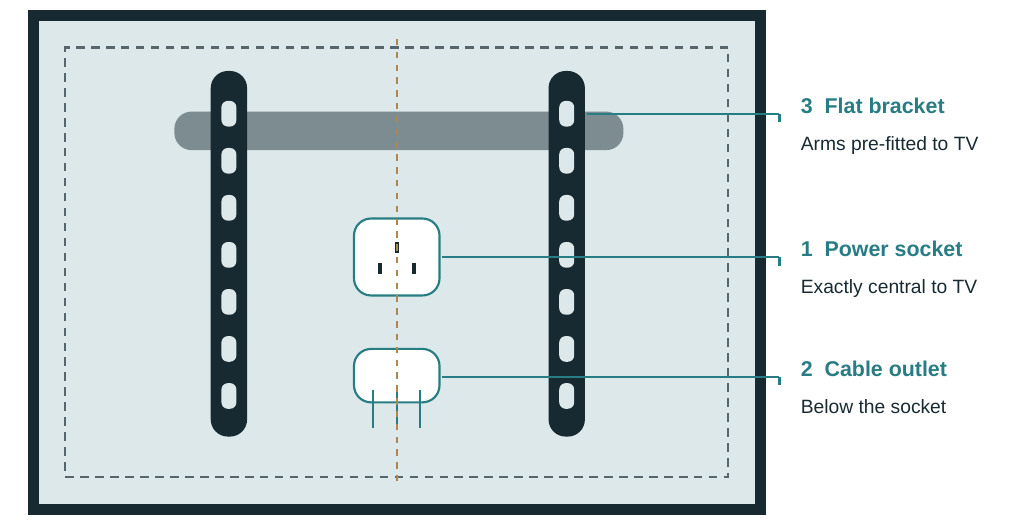
Position the power socket exactly centrally behind the television. A socket fitted flush with the finished wall allows the supplied slim TV plug to fit in the space between the bracket arms, both in depth and from side to side.
Place the separate cable outlet directly below the socket, clear of the wall plate and fixing points. For a bespoke mirror with an off-centre TV, use the TV centre rather than the outer mirror centre.
Central position. Flush socket. Concealed cables.
The socket face must sit flush with the finished wall, with no protruding surface box.
Power & cable planning.
Choose the connections you will use now, plus a spare where practical. All outlets and cable ends should remain concealed within the Mirror TV footprint.
A flush socket fits the supplied slim TV plug
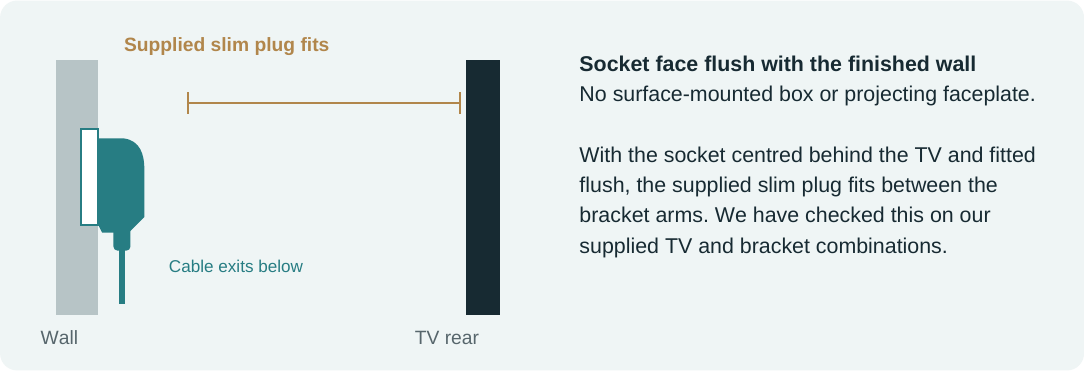
With the socket centred behind the TV and fitted flush, the supplied slim plug fits between the bracket arms. We have checked this on our supplied TV and bracket combinations.
Connection checklist
- Power
A power socket exactly central behind the TV, fitted flush with the finished wall.
- HDMI
Plan 2–3 leads in total, including at least one spare, subject to the TV’s available inputs.
- Ethernet
A wired network cable if you want a wired internet connection.
- USB (optional)
An extension if needed; confirm compatibility and intended use.
- Other inputs
Aerial/coax, satellite, optical audio or a soundbar connection if required by your equipment.
Before closing the wall
Agree cable lengths, connector clearance and routes with your electrician or AV installer. Leave enough slack to connect and hang the TV without pinching cables. Label and test every lead first; confirm HDMI performance for your devices and run length.
Use a registered electrician for electrical work.
Find an electrician · Electrical Safety FirstBracket & installation.
Every Mirror TV is supplied with a flat wall bracket. The TV-side arms are already fitted during production.
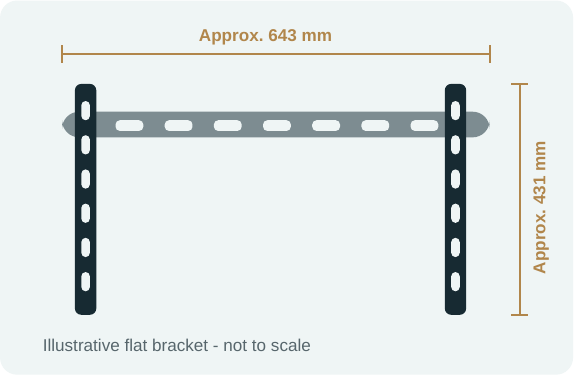
Your supplied bracket
The wall section is secured to the wall, then the TV hangs onto it using the pre-fitted arms.
Follow the supplied bracket instructions, including any locking or retaining steps.
Approximate sizing only. The illustrated 643 × 431 mm dimensions are based on the earlier bracket reference and may differ from the bracket supplied with your order. Confirm the current bracket dimensions with us; use the actual bracket to mark fixings.
- 01
Prepare the wall
Complete and test the electrics and cable runs.
- 02
Fit the wall section
Use fixings suitable for the wall and assembled TV weight.
- 03
Connect & hang
Connect leads, hang the TV and secure it as instructed.
Delivery & installation
Our service includes delivery, mounting the Mirror TV, plugging it into the prepared supply and demonstrating it working. Available within our installation area; confirm coverage when ordering.
All wall electrics and cable runs must be completed beforehand. Conduit or trunking, electrical work and in-wall input installation are not supplied by us.
Current options and charges are confirmed when ordering; the downloadable PDF may show an earlier price.
Already have sockets and cables in place?
Send us a clear, straight-on photo showing the existing socket and cable outlet, plus a wider view of the wall. Tell us where you want the Mirror TV, including its intended height and any measurements available.
We will review the layout and let you know whether fitting around your existing electrics is feasible, or whether changes are needed. An off-centre socket may still be suitable; let us assess it before arranging any alterations.
If cables are not concealed in the wall, arrange suitable conduit or trunking separately before our visit.